Number Locator- Call Location
- 4.3
- Rating
- 10.00M
- Installs
- Free
- Price
 Analysis by App-foxy
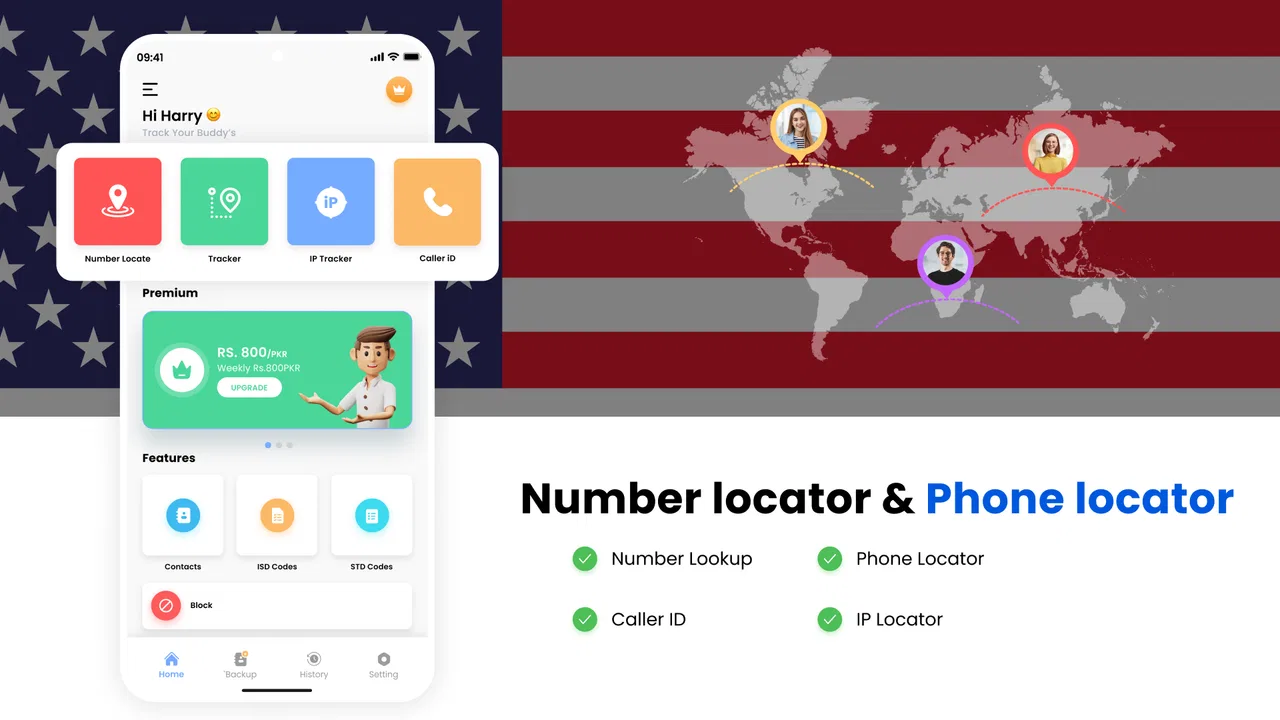
Number Locator- Call Location is a free Android navigation app from Appstark Tech that focuses on identifying phone caller locations and helping users work with a phone number locator. I approached it with a fairly practical question: can it add useful context to an unfamiliar call, or does it mainly sound more powerful than it feels in everyday use?
My experience is mixed but understandable. The app is easy to recognize as a quick utility rather than a complete navigation replacement. It may appeal to someone who regularly receives unknown calls and wants a simple place to start checking a number. At the same time, I would not treat it as a precision tracking tool, a substitute for emergency services, or a replacement for a full map application. The most important expectation to set is that a caller-location tool should be used as a clue, not as proof of a person’s exact whereabouts.
What Number Locator is really useful for
The app sits in the Maps & Navigation category, although its main purpose is different from turn-by-turn navigation. Instead of planning a route or finding nearby businesses, it centers on phone caller location and number lookup. That makes its natural use case a quick check after seeing an unfamiliar number, especially when the caller’s area may help you decide whether to answer, return the call, or ignore it.
You May Also Like

 Blood Strike: 2.5 Anniversary
Blood Strike’s Loadouts Turn Every Drop Into a Tactical Gamble
A close look at Blood Strike’s custom loadouts: how fast access to signature weapons reshapes its battle royale rhythm, rewards preparation, and narrows the gap between fights.

 Pandora - Music & Podcasts
Pandora’s Music Is Easy to Start, but Harder to Recover
Pandora’s strength is its low-effort path from a seed to a station. Its weak spot is how much confidence it asks you to place in connection, setup, and quiet recovery.

 8 Ball Pool
 Is Built on Rivalries, Rematches, and Routine
A close look at the rivalries, rematches, shared routines, and unanswered safety questions that turn a quick pool match into a persistent mobile community.

 Samsung Music
’s Quiet Strength Is Playing What You Already Own
Its reach comes less from spectacle than from dependable access to a personal library. That simplicity is both the app’s strongest retention engine and its ceiling.

 AccuWeather: Weather Radar
AccuWeather Review: A Quick, Clear Forecast for Everyday Decisions
For everyday plans, the best forecast is the one you can understand quickly. AccuWeather makes rain timing, radar, and local conditions easy to act on, with a few trade-offs.

 Hill Climb Racing
Why Hill Climb Racing Still Turns Crashes Into One More Run
A tiny car, a bumpy hill and one more upgrade: Hill Climb Racing keeps resurfacing because its simple chaos makes every near-miss feel personal.
More From Our News Desk



I can imagine using it after a missed call from a number I do not recognize. I would enter the number, review whatever location context the app presents, and then compare that clue with the call’s timing, message, and any information already visible on the phone. That workflow is more sensible than assuming the displayed location identifies the caller’s current address. A number can be associated with a region without telling me where the device is now.
This distinction matters because the wording around caller location can easily create unrealistic expectations. Number Locator- Call Location is best approached as a lookup utility. It is not something I would use to monitor a family member, follow a vehicle, or make a safety decision based on a single result. For those situations, a dedicated location-sharing feature with clear consent is the more appropriate choice.
Who may find it worthwhile
The app makes the most sense for people who want a lightweight way to investigate unfamiliar calls without opening a full mapping service first. It can also be useful for someone who handles many calls and wants regional context before deciding how much attention a number deserves. That is a modest benefit, but modest benefits can still be practical when the workflow is fast and the user understands its limits.
People who expect exact, live positioning should skip it. The same applies to anyone looking for a comprehensive navigation experience with saved places, traffic guidance, public transport planning, or detailed route options. Those are jobs for established map platforms. Number Locator- Call Location has a narrower purpose, and judging it against a full navigation app would be unfair to both tools.
My first impression of the app’s trust profile
Trust is especially important here because phone numbers and location-related information feel personal. I do not judge this kind of app only by whether it produces a result. I also look at what the app asks me to do, what choices are visible, whether an account seems necessary, and whether the interface gives me a clear way to stop using a lookup. Those details shape whether I would keep the app installed.
In this case, I would use a cautious approach. I would avoid entering numbers that are not necessary for the specific check, and I would not use the app to investigate friends, relatives, or strangers without a legitimate reason. A location result can be misunderstood, and the person behind a number may not know that someone is trying to identify them. Responsible use is not an optional extra for this category; it is part of evaluating the app.
The developer is Appstark Tech, and the app has reached over ten million installs. That level of adoption tells me that many people are willing to try the concept, but it does not by itself prove accuracy, privacy quality, or long-term reliability. The average rating is 3.3 from around fifteen thousand ratings, which suggests a divided experience rather than universal satisfaction. I read that as a reason to test it carefully instead of assuming the install count guarantees a good result.
Controls I would check before using it regularly
Before making Number Locator part of my routine, I would inspect every visible permission request and only allow access that matches the task I intend to perform. If the app asks for something unrelated to a one-time number lookup, I would pause and decide whether the convenience is worth that access. I would also check the phone’s system settings afterward, because Android gives me a way to review and change permissions rather than treating the first decision as permanent.
I would look for clear controls around search history, notifications, account use, and any option connected with paid features. The point is not to assume that a control exists or does not exist; it is to verify what is actually shown on my own device. If I cannot understand how to remove a search, stop notifications, or avoid an optional purchase, I would not move from occasional testing to regular use.
The app is free to install, but it includes in-app purchases ranging from about one dollar to nearly thirteen dollars per item. That makes the purchase screen worth examining before tapping through a workflow quickly. I would check whether a paid option is presented as an enhancement, a recurring plan, or a one-time purchase, and I would confirm the final wording in the store or payment dialog. A free starting point does not mean every useful action is free.
I would also keep an eye on the current version, which is 2.39, because interfaces and permission prompts can change between updates. My advice is simple: after an update, revisit the app’s permissions and purchase settings instead of assuming they still look the same. This is a good habit for any tool that touches phone numbers or location-related information.
How I would handle a real missed-call scenario
Imagine I receive a missed call during work from a number I do not recognize. I would first check whether the caller left a message or whether the number appears in a contact, email, delivery notice, or appointment reminder. Only after that basic check would I open Number Locator- Call Location. I would enter the number carefully, read the result as regional context, and avoid treating it as confirmation that the caller is physically in that place.
If the result looks unfamiliar, I would not call back automatically. I would search for other signs of legitimacy, such as a clear voicemail or a message I was expecting. If the call seems suspicious, blocking or reporting it through the phone’s normal controls is more useful than repeatedly looking it up. This is one of the app’s less obvious trade-offs: a lookup can satisfy curiosity, but it does not necessarily improve the decision that follows.
I would also avoid entering a number into the app while someone is standing beside me unless I had a good reason and understood the privacy implications. A phone number is not just a random string; it can be linked to a real person. The safest workflow is to use the minimum information required, avoid sharing screenshots of results, and delete anything I no longer need if the app provides a clear way to do so.
Where the app can disappoint
The biggest limitation is the gap between a location label and a precise location. Even when a lookup gives a recognizable area, that does not establish where the caller is at the moment. Numbers can be used while traveling, transferred between services, associated with businesses, or displayed through systems that do not reflect a caller’s physical position. I would therefore treat an unexpected result as a prompt for further checking, not as evidence.
There is also a practical accuracy question. A caller-location app depends on the information available to its lookup process, and not every number will produce equally useful context. Business lines, internet-based numbers, international numbers, recently changed numbers, and private or unusual entries may be less informative. When the result is vague or unhelpful, repeatedly trying the same number is unlikely to turn it into a reliable live location.
Another source of friction is the possibility of ads, upgrade prompts, or a workflow that makes the free experience feel limited. I would not call that unusual for a free utility, but it affects whether the app feels comfortable for frequent use. If I only need an occasional check, that may be acceptable. If I handle unknown calls every day, a cluttered process could become more annoying than useful.
The app is rated for Everyone, and it requires Android 7.0 or later. The broad age rating makes it easy for a wide audience to encounter, but I would still explain the privacy and consent issues to younger users rather than presenting it as a harmless game-like lookup. A simple interface can hide complicated social consequences when the subject is another person’s phone number.
Number Locator compared with familiar alternatives
Compared with Google Maps or Apple Maps, this app is more focused on phone-number context and far less suitable for movement from one place to another. A traditional map app is the better choice when I need directions, traffic information, business details, saved locations, or a visual understanding of an area. Number Locator- Call Location is only preferable when the starting point is an unknown call rather than a destination.
Compared with the caller-identification tools built into some phones and carrier services, the app may feel like an additional layer to open and manage. Native tools can be more convenient because they are already connected to the calling experience, while a separate app may offer a dedicated lookup workflow. On the other hand, installing a separate utility means I should pay closer attention to its permissions, notifications, and purchase prompts.
Compared with a consent-based location-sharing service, it serves a completely different purpose. A family location app or messaging feature is designed around people choosing to share their position with one another. Number Locator is not something I would use as a replacement for that arrangement. If my real need is knowing where a willing contact is, I would choose a service built for explicit sharing rather than trying to infer location from a number.
Practical habits that make the app safer to use
I would keep the app for occasional, specific lookups rather than granting it a permanent role in every call. That reduces the amount of personal information I expose and helps me notice when the app is asking for more access than the task requires. After a short test, I would review Android’s permission manager and disable anything I no longer consider necessary.
I would never use a result to confront someone, accuse a caller of lying, or make an emergency decision. If a situation involves immediate danger, I would contact the appropriate emergency service instead of relying on a consumer lookup. This is not a minor disclaimer: a misleading location assumption can waste time or put someone at risk.
I would also keep purchases deliberate. Since individual items can cost from roughly one dollar to almost thirteen dollars, I would read the payment screen, check whether the charge is one-time or recurring, and use device purchase authentication. If the free workflow already answers my occasional question, paying may not add enough value for my needs.
Finally, I would uninstall the app if I stopped using it, especially if I no longer remembered why I had installed it. Removing an app is not a substitute for reviewing account or data controls, but it is a sensible way to reduce unnecessary access. I would make that decision based on my own use, not on the install count or the promise implied by the app’s name.
My cautious verdict
Number Locator- Call Location is a narrowly focused free utility that can help me investigate an unfamiliar number, provided I keep my expectations realistic. Its strongest use is quick regional context during a missed-call check. Its weakest point is the temptation to confuse that context with exact, current tracking. That distinction determines whether the app is a sensible helper or a source of false confidence.
I would recommend trying it to people who want an occasional number lookup and are comfortable reviewing permissions, privacy choices, and purchase prompts themselves. I would not recommend it to anyone seeking live tracking, dependable emergency information, or a complete navigation system. In those cases, a consent-based location service, the phone’s own caller tools, or a standard map app is a better match.
The app is free, rated for Everyone, and compatible with Android 7.0 and later, so the entry barrier is low. Still, the moderate 3.3 average and the presence of paid items reinforce my view that it deserves a careful trial rather than automatic trust. My final advice is to use the smallest amount of information needed, verify every visible choice, and treat each result as one small clue. If you can keep that boundary clear, the app may earn a place as an occasional caller-location tool; if you need certainty, choose something designed for certainty instead.
FAQs for Number Locator- Call Location
01What is Number Locator - Call Location used for?
Number Locator - Call Location is designed to help users identify the geographical location of phone numbers. It provides an easy way to track incoming or outgoing calls' origins, which can be useful for understanding unknown numbers or verifying caller information.
02Is Number Locator - Call Location free to use?
The app typically offers a free version with basic features, allowing users to locate phone numbers and view call details. However, there might be premium features available through in-app purchases, providing more detailed information and enhanced functionalities.
03How accurate is the location information provided by the app?
The accuracy of the location information depends on several factors, including the source of the number and available data. While it can reliably indicate the country or region, it might not pinpoint the exact location, especially for mobile numbers. It's best used as a general guide.
04Does the app require an internet connection to work?
Yes, Number Locator - Call Location generally requires an internet connection to access and update its database. This ensures that the app can provide the most current and accurate information about phone numbers and their locations.
05Is my personal data safe with Number Locator - Call Location?
The app is designed with user privacy in mind, typically using secure servers to store and process data. However, it's always recommended to review the app's privacy policy to understand how your data is managed and ensure it aligns with your privacy preferences.
Pros
- Accurate location tracking for calls.
- Easy-to-use interface for all users.
- Supports multiple languages.
- Real-time updates on caller info.
- Minimal battery usage during operation.
Cons
- Limited features in the free version.
- Ads can be intrusive at times.
- Requires internet for full functionality.
- Occasional glitches in location accuracy.
- Not available in all countries.

Number Locator- Call Location
Gallery